POWERED BY TRELLIS · OPEN SOURCE · FREE, NO SIGNUP
Free AI image to
3D model converter.
Pic2Mesh AI turns a single picture into a textured, downloadable 3D model in about a minute. Free image-to-3D conversion for makers, game devs, and sellers — no account, no watermark.
⬆
Drop a photo here
or click to browse · JPEG / PNG / WebP · max 8 MB
One clear object on a simple background works best.
Rendering capacity unavailable
Buy 50 for US$4.90Need more than today’s 3 free runs?
Purchases resume after rendering capacity is restored.
◇
Your interactive 3D model appears here.
Rotate, zoom, download as GLB.
ROBLOX WORKFLOW · INDEPENDENT BROWSER TOOL
Looking for a way to turn an image into a Roblox prop?
Generate a textured GLB here without installing a plugin or entering a Roblox API key, then import the file into Roblox Studio. Pic2Mesh AI is independent and is not affiliated with Roblox or any Studio plugin.
Open the Roblox workflow →ASSET HANDOFF
PHOTO
JPEG / PNG
.GLB
TEXTURED
STUDIO
IMPORT
✓ Great inputs
- One object, centered, filling the frame
- Product shots, toys, figurines, sneakers, furniture, food
- Plain or uncluttered background, even lighting
- Square-ish photos beat wide panoramas
✗ Won't work well
- Landscapes, rooms, streets — any full scene (comes out as a flat slab)
- Wallpapers and concept art with many elements
- Mirrors, glass, and very shiny surfaces
- People portraits (use a figurine photo instead)
REAL PRODUCTION OUTPUT
Inspect a real result before you spend a credit
This textured GLB was generated on Pic2Mesh AI from the single toy-car photo below, using the same pipeline available in the tool above.
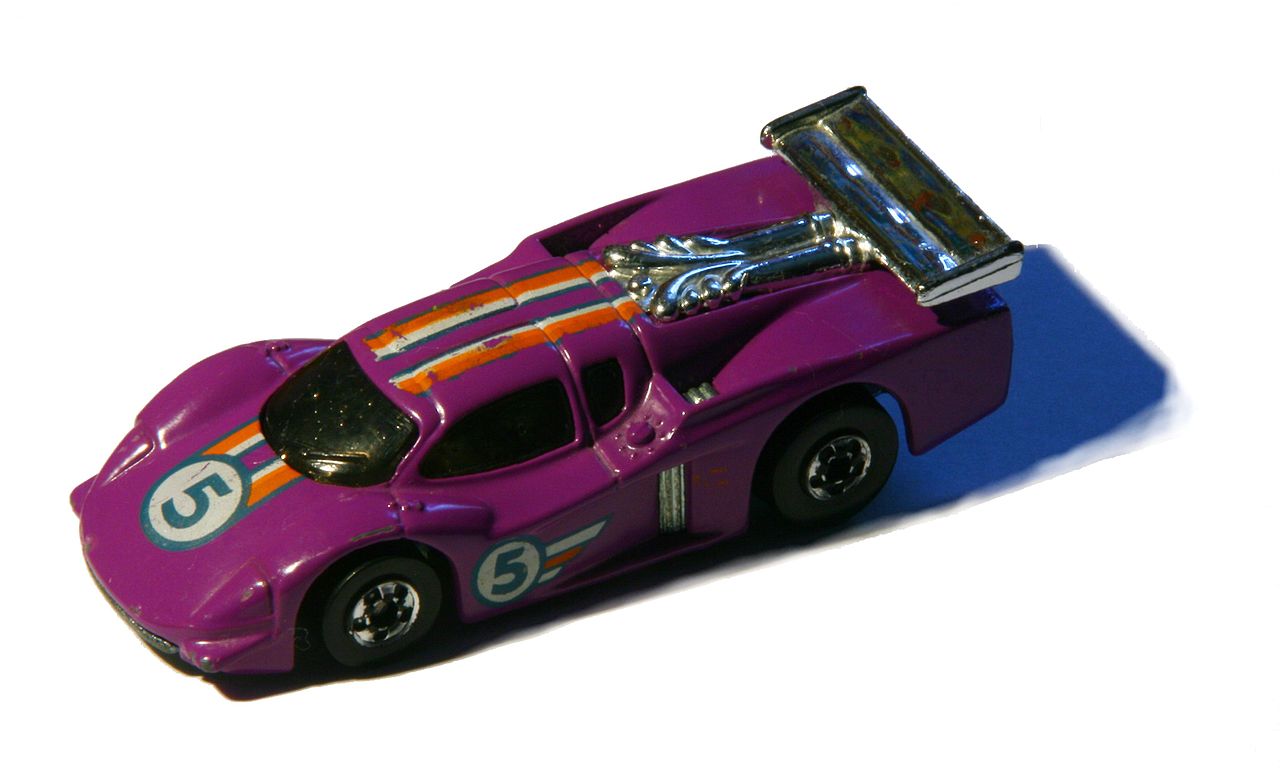
Single-view AI has to infer the hidden side of an object, so geometry and color can differ from the source. Use the free generations to inspect your own result before using another generation.
How it works
01
Snap or pick a photo
Any JPEG, PNG, or WebP of a single object — a product shot, a toy, a chair, your sneaker.
02
AI builds the geometry
TRELLIS runs two diffusion stages: sparse voxel structure first, then refined mesh with baked textures.
03
Spin it, download GLB
Inspect the model right in your browser, then download a GLB ready for Blender, Unity, or your slicer.
What people build with it
E-commerce
Turn product photos into interactive 3D viewers that lift conversion.
Game assets
Rough out props and set dressing from reference photos in minutes.
3D printing
Go from a photo of a broken part or figurine to a printable mesh.
AR / VR
GLB drops straight into WebXR, RealityKit conversion, and Three.js scenes.
Curious about the tech? Read our guides on how image-to-3D AI works and the TRELLIS model.
Free access and one-time credit packs
Use three free generations each day, or buy a one-time credit pack for larger batches. There is no subscription and credits do not expire.
Generation and new purchases are temporarily paused while rendering capacity is restored. Existing credits remain valid and do not expire.
Free
$0
3 generations / day
Temporarily unavailable while rendering capacity is restored.
Starter
BEST FIRST PACK$4.90
50 generations · 9.8¢ each · never expire
The lowest-risk way to finish a product batch or weekend project.
Temporarily pausedMaker
BEST VALUE$9.90
150 generations · 6.6¢ each · never expire
For sellers and game devs converting on the regular.
Temporarily pausedOne credit = one generation. One-time purchase, no subscription. Checkout and tax collection are handled by Creem as merchant of record.
Unused credits are refundable within 14 days. See our terms and refund policy.
Frequently asked questions
What is Pic2Mesh?
Pic2Mesh AI is a free online AI image-to-3D converter. You upload a single photo of an object and get back a fully textured 3D model in about a minute, powered by TRELLIS, Microsoft's open-source image-to-3D model. The model downloads as a GLB file that works in Blender, Unity, Unreal, Three.js, and most 3D printing slicers after conversion.
Is it really free?
Free generation and new credit-pack purchases are temporarily paused while rendering capacity is restored. Existing credits remain valid and do not expire.
What kind of photos work best?
One clear object, centered, on a simple or plain background. Product shots, toys, furniture, sculptures, sneakers, and food all work well. Full scenes, people, and very shiny or transparent objects are harder for the model.
What format is the output?
GLB (binary glTF) with baked textures — the standard interchange format for web and game 3D. Import it directly into Blender, Unity, Unreal, Godot, or view it in any online GLB viewer. For 3D printing, import the GLB into your slicer or convert to STL in Blender in two clicks.
How long does a generation take?
Usually 30–60 seconds depending on queue length. The model runs two diffusion stages: a sparse structure pass that blocks out geometry, then a latent pass that refines shape and bakes textures.
Can I use the models commercially?
TRELLIS is MIT-licensed and outputs you generate from your own images are yours to use, including commercially. Make sure you have rights to the source photo itself.